 Skip to content

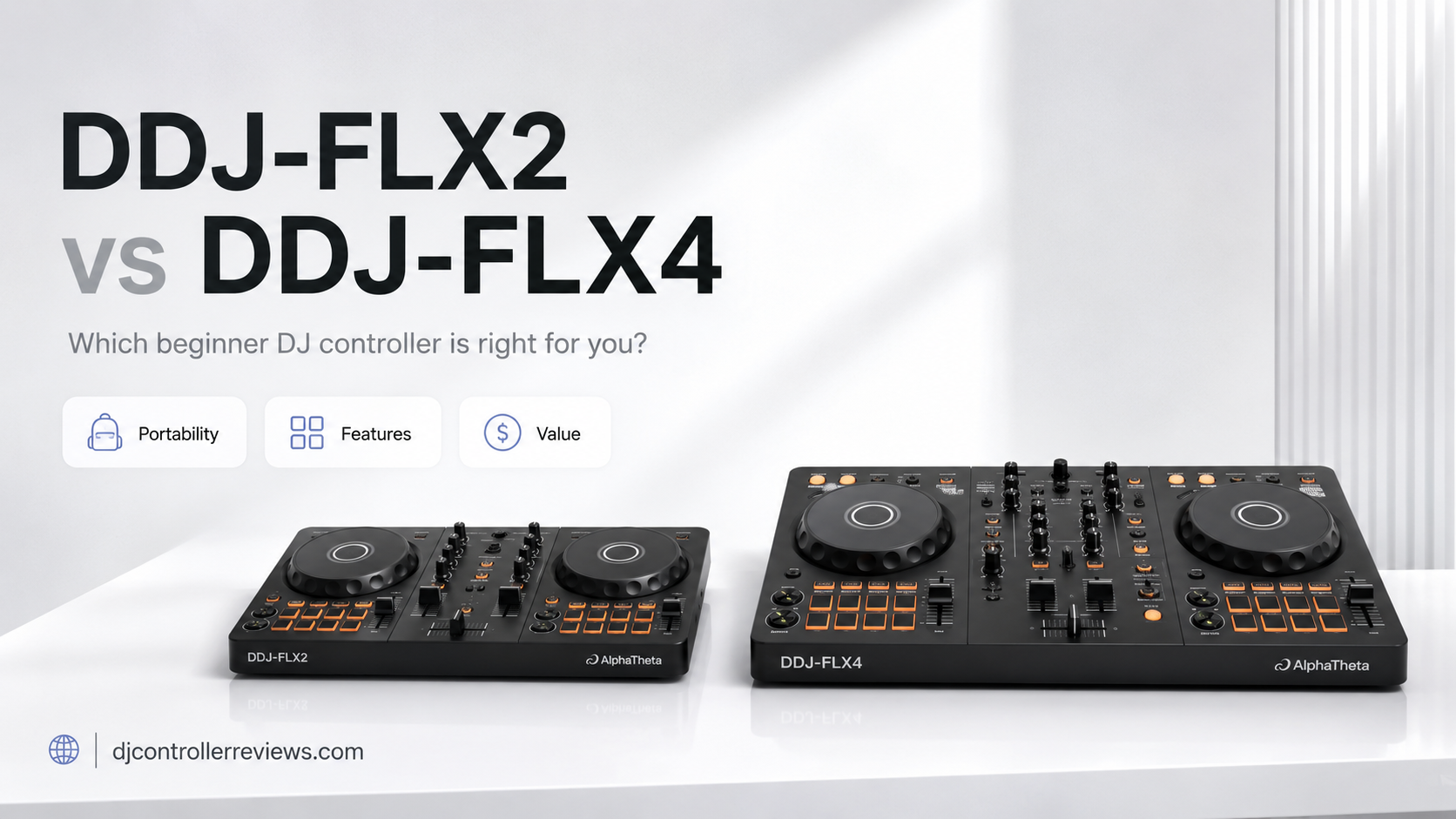
If you’re comparing the DDJ-FLX2 vs DDJ-FLX4, I can probably guess what happened.
You decided you wanted to learn DJing.
You found the DDJ-FLX2 and thought, “Perfect. Small, affordable, does DJ things.”
Then you discovered the DDJ-FLX4.
Now you have 17 browser tabs open, you’ve watched a man on YouTube explain jog-wheel dimensions for 23 minutes, and somehow buying a DJ controller has become a major life decision.
I’ve been there.
The good news is that choosing between these two is actually pretty straightforward once you ignore the marketing glitter.
My short answer: I recommend the DDJ-FLX4 for most beginners.
The DDJ-FLX2 is the better choice if portability, simplicity, mobile DJing, and a lower price matter most. But the DDJ-FLX4 is the better controller for learning traditional DJ skills, growing beyond the beginner stage, connecting to speakers and a microphone, and getting a more complete hands-on DJ experience.
AlphaTheta itself currently positions the FLX2 as its value-focused controller for easy phone-based DJing, while describing the FLX4 as a compact controller with more complete core functions and a layout inherited from professional controllers.
So, yes, they’re siblings.
But one is the little sibling who travels everywhere with a backpack.
The other has already started talking about “my setup.”
Let’s compare them properly.
My pick for most people: DDJ-FLX4 🏆
The FLX4 costs more and takes up more desk space, but I think its fuller mixer controls, dedicated effects section, better connectivity, and larger layout make it worth the step up for anyone serious about learning.
[Check Today’s Price on Amazon – DDJ-FLX4]
Affiliate disclosure: This article may contain affiliate links. If you buy something through one of these links, we may receive a small commission at no additional cost to you.
DDJ-FLX2 vs DDJ-FLX4: Quick Comparison
Don’t want to read several thousand words about two rectangles with jog wheels?
Fair.
Here’s the important stuff.
| Feature | AlphaTheta DDJ-FLX2 | AlphaTheta DDJ-FLX4 |
| Best for | 🎒 Portable/casual beginners | 🏆 Most beginner DJs |
| Channels | 🎚️ 2 | 🎚️ 2 |
| Weight | 🪶 1.2 kg / 2.6 lb | 💪 2.1 kg / 4.6 lb |
| Dimensions | 📏 383.2 × 208 × 48.2 mm | 📏 482 × 272.8 × 59.2 mm |
| Smart Fader | ✅ Yes | ✅ Yes |
| Smart CFX | ✅ Yes | ✅ Yes |
| Performance pads | ✅ Yes | ✅ Yes |
| Dedicated Beat FX section | ❌ No comparable full section | ✅ Yes |
| 3-band EQ | ⚠️ More simplified control layout | ✅ Dedicated HI/MID/LOW EQ |
| Master output | 🔌 3.5 mm stereo mini | 🔊 RCA |
| Mic input | ❌ No | 🎤 Yes |
| Headphone output | 🎧 3.5 mm | 🎧 3.5 mm |
| Bluetooth | 📱 Yes | 📱 Yes |
| USB-C | ✅ 1 port | ✅ 2 ports |
| Mobile-friendly | ⭐⭐⭐⭐⭐ | ⭐⭐⭐⭐½ |
| Traditional DJ workflow | ⭐⭐⭐½ | ⭐⭐⭐⭐⭐ |
| Portability | ⭐⭐⭐⭐⭐ | ⭐⭐⭐⭐ |
| Room to grow | ⭐⭐⭐½ | ⭐⭐⭐⭐⭐ |
| My verdict | 👍 Great starter | 🏆 Better overall buy |
| Price | [Check FLX2 Price on Amazon] | [Check FLX4 Price on Amazon] |
The size difference is significant. The FLX2 weighs just 1.2 kg, while the FLX4 weighs 2.1 kg. The FLX2 measures 383.2 × 208 × 48.2 mm compared with 482 × 272.8 × 59.2 mm for the FLX4.
My Quick Verdict
If I were buying my first proper DJ controller, I would choose the DDJ-FLX4.
If I wanted something ultra-portable for mixing from my phone, learning casually, traveling, or seeing whether DJing sticks before spending more money, I’d choose the DDJ-FLX2.
What Are the DDJ-FLX2 and DDJ-FLX4?
Both are two-channel DJ controllers designed to make entering the world of DJing relatively painless.
Which is nice, because learning to phrase-match two tracks that apparently hate each other provides enough pain already.
What Is the DDJ-FLX2?
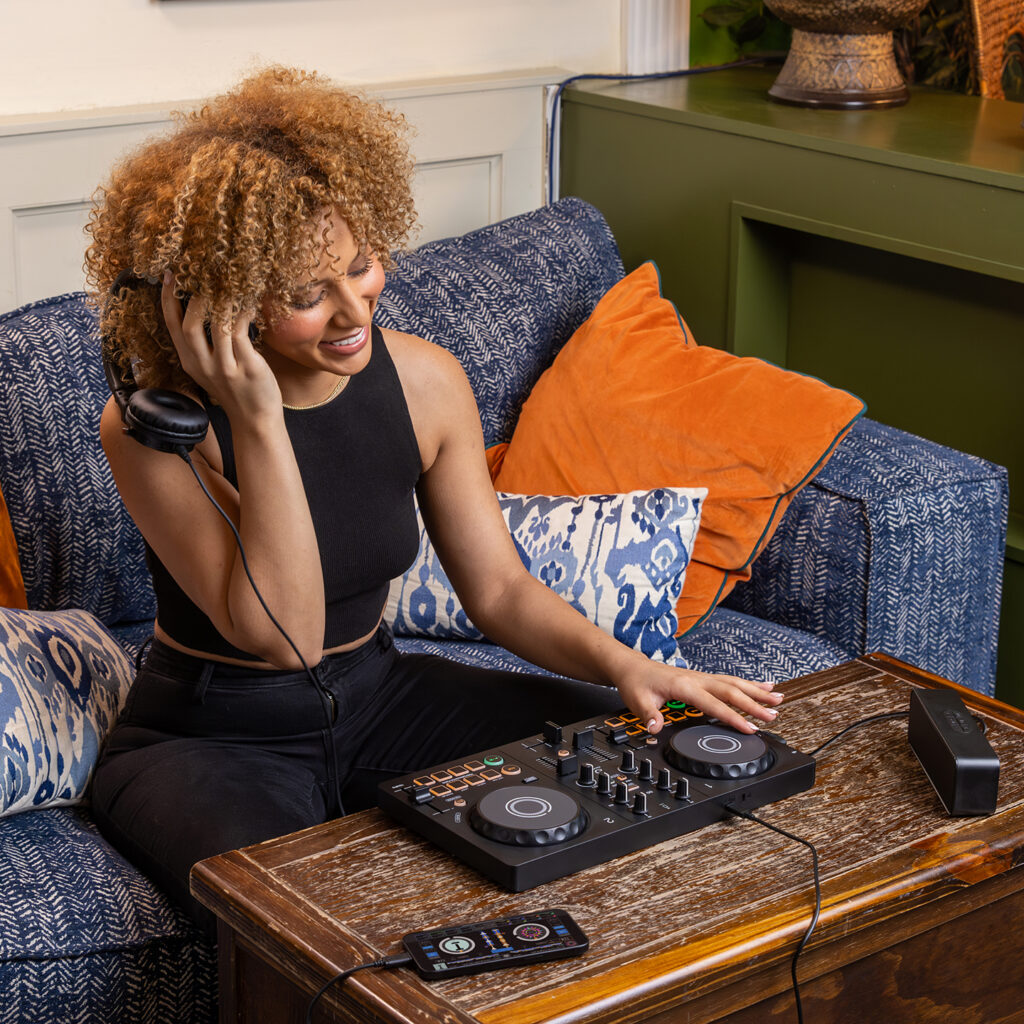
The AlphaTheta DDJ-FLX2 is the smaller and more entry-level of the two.
AlphaTheta calls it its lightest and most compact DJ controller. It can work with computers and mobile devices, runs from USB bus power when connected appropriately, and includes beginner-friendly tools such as Smart CFX and Smart Fader.
Its compatible software currently includes:
- rekordbox for Mac/Windows
- rekordbox for iOS/Android
- djay Pro for Mac/Windows
- djay for iOS/Android
- Serato DJ Lite
- Serato DJ Pro with the required license
- Traktor Play
That last one is worth noting because AlphaTheta added official Traktor Play support to both the FLX2 and FLX4 in 2025.
The FLX2 is essentially designed to make starting DJing as frictionless as possible.
And, for once, “frictionless” doesn’t mean “we removed everything useful.”
What Is the DDJ-FLX4?
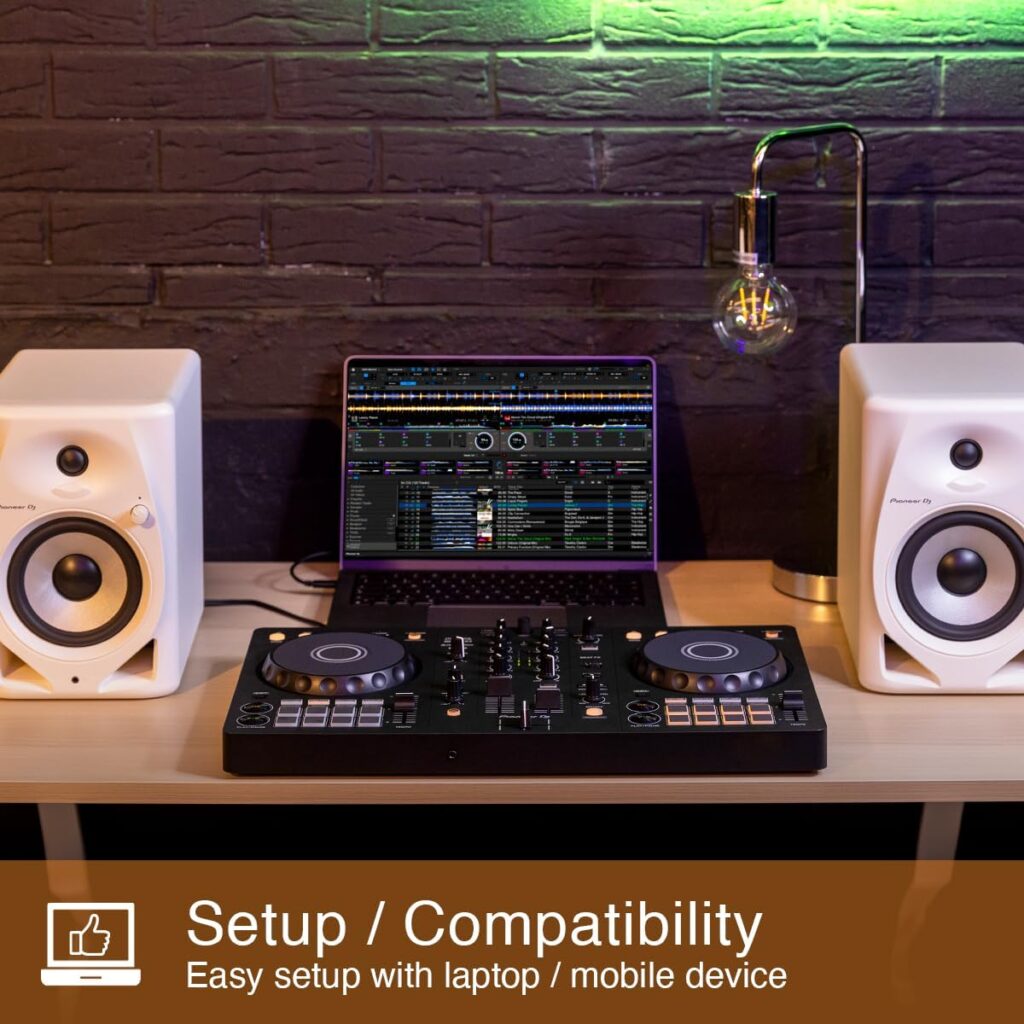
The DDJ-FLX4 sits a step above the FLX2.
It is still firmly beginner-friendly, but the physical layout is more substantial and closer to the conventional two-deck-and-mixer design you’ll encounter as you move toward more advanced DJ equipment.
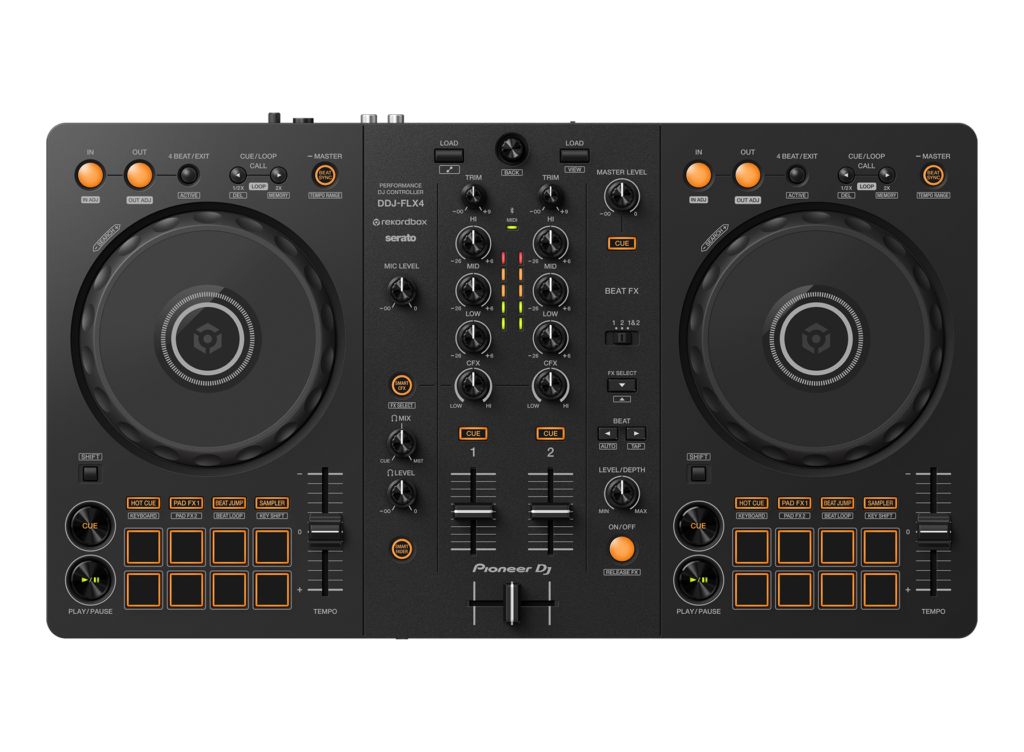
You get dedicated channel trim, three-band EQ, filters/Color FX, channel faders, a crossfader, performance pads, looping controls, tempo controls, and a dedicated Beat FX section. Pioneer DJ also specifically describes the FLX4 as having a simple layout with a “professional feel.”
That’s the difference I care about most.
The FLX2 gets you DJing.
The FLX4 starts teaching your hands where DJ controls normally live.
DDJ-FLX2 vs DDJ-FLX4: The Biggest Differences
Let’s get to the bits that actually matter when your credit card is hovering dangerously near the checkout button.
1. The FLX4 Has a Much More Complete DJ Layout
This is the main reason I’d spend extra on the FLX4.
The DDJ-FLX4 gives you dedicated:
- Trim controls
- Three-band EQ controls
- Channel cue controls
- Channel faders
- Crossfader
- Filter/CFX controls
- Headphone mixing controls
- Beat FX controls
- Performance pads
- Loop controls
- Tempo faders
The FLX4’s supported hardware diagrams show independent HI, MID, and LOW EQ controls, a dedicated Beat FX section, headphone mix and level controls, plus the expected mixer controls.
The FLX2 deliberately simplifies things.
That’s not inherently bad.
If you’re learning casually, simplicity can be wonderful. Nobody has ever opened their first DJ controller and complained that there weren’t enough mysterious buttons.
But long-term, I prefer the FLX4 because it encourages you to learn conventional DJ workflow from day one.
Winner: DDJ-FLX4 🏆
[Check Today’s DDJ-FLX4 Price on Amazon]
2. The DDJ-FLX2 Is Much More Portable
Here the FLX2 fights back—and lands a very solid punch.
The DDJ-FLX2 weighs only 1.2 kg / 2.6 lb.
The FLX4 weighs 2.1 kg / 4.6 lb.
That’s a 0.9 kg difference, and you notice it when the controller is sharing a backpack with your laptop, headphones, charger, cables, water bottle, and the emergency snack you promised yourself you wouldn’t eat before the train arrived.
The FLX2 is also significantly smaller.
FLX2 dimensions:
383.2 × 208 × 48.2 mm
FLX4 dimensions:
482 × 272.8 × 59.2 mm
For dorm rooms, tiny desks, travel, casual parties, and spontaneous practice sessions, I prefer the FLX2.
There’s something appealing about a controller you can actually put away when you’ve finished using it.
Winner: DDJ-FLX2 🎒
[Check Today’s DDJ-FLX2 Price on Amazon]
3. DDJ-FLX2 vs FLX4 for Beginners
Technically, both are beginner controllers.
But I think they’re designed for different types of beginner.
The FLX2 Is Better for the “I Want to Try DJing” Beginner
If your internal monologue sounds something like:
“DJing seems fun. I have Spotify playlists. I once controlled the aux cable at a barbecue. Perhaps this is my destiny.”
…the FLX2 makes a lot of sense.
It lowers the barrier to entry.
AlphaTheta built it around mobile-device compatibility, several DJ applications, streaming-service integration through supported software, tutorials, and simplified mixing tools.
You can get started without feeling as though you’ve accidentally walked into the cockpit of a Boeing 737.
The FLX4 Is Better for the “I Want to Learn DJing Properly” Beginner
If you already know you’re serious about practicing, recording mixes, learning EQ transitions, understanding effects, and eventually playing parties or gigs, I would skip directly to the FLX4.
The extra physical controls matter.
Learning how to manipulate separate low, mid, and high frequencies is fundamental DJ territory.
So is learning gain staging.
So is cueing through headphones properly.
So is figuring out why adding an enormous echo to every transition seemed like a good idea at 11:45 p.m.
Winner: DDJ-FLX4 🏆
The FLX2 is easier.
The FLX4 is more educational.
Those aren’t quite the same thing.
4. DDJ-FLX2 vs DDJ-FLX4: Jog Wheels
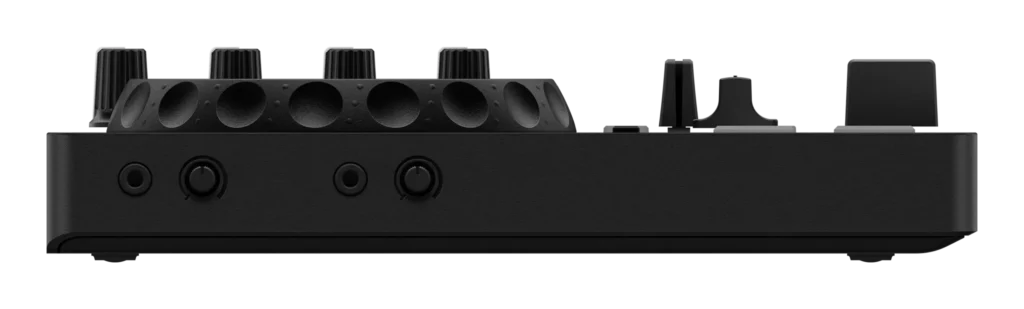
Neither controller is a dedicated scratch machine.
If you’re planning to spend your evenings practicing transformers, chirps, crabs, and other scratch names that sound increasingly like things you’d encounter near a beach, there are better specialist controllers.
But for normal beginner beatmatching and cue manipulation, both work well.
The advantage I give the FLX4 is primarily ergonomic.
Because the controller itself is larger, the deck areas feel less compressed. There is simply more physical space around your controls.
On the FLX2, everything is designed around minimizing size.
That’s great in a backpack.
Less great if you’ve got large hands and the subtle motor control of a golden retriever.
Winner: DDJ-FLX4 🏆
5. Mixer Controls: This Is Where the FLX4 Pulls Away
For me, this might be the decisive category.
The FLX4’s mixer section looks and behaves much more like the traditional DJ mixer layout I want beginners to become comfortable with.
You get dedicated:
- Trim
- HI EQ
- MID EQ
- LOW EQ
- Color FX/filter
- Cue
- Channel faders
- Crossfader
That means I can practice transitions using EQ rather than relying excessively on automated assistance.
And that’s important.
Smart Fader is clever.
I like Smart Fader.
Smart Fader is my friend.
But if Smart Fader becomes the only way I know how to mix, we’ve moved from “helpful feature” to “tiny electronic dependency.”
Winner: DDJ-FLX4 🏆
[Check Today’s DDJ-FLX4 Price on Amazon]
6. Smart Fader: Both Make Transitions Easier
Both controllers offer Smart Fader.
The idea is simple: make difficult transitions easier for newcomers.
On the FLX2, AlphaTheta says Smart Fader can automatically optimize volume, BPM, and bass while you move the crossfader.
The FLX4 provides Smart Fader functionality too, automatically adjusting elements including volume, bass volume, and BPM to help smooth transitions between tracks.
This is particularly useful when moving between songs with noticeably different tempos.
For example:
House track at 124 BPM.
Hip-hop track at 94 BPM.
Beginner DJ without Smart Fader:
“Excellent. I appear to have driven both songs into a ditch.”
Beginner DJ with Smart Fader:
“Oh. That’s considerably better.”
It’s a legitimate learning aid.
Just don’t let it replace learning phrasing, EQ mixing, tempo control, and manual transitions.
Winner: Tie 🤝
7. Smart CFX: Another Tie
Both also offer Smart CFX functionality.
On the FLX2, Smart CFX can be triggered through the performance pads to recreate more complex effect techniques.
On the FLX4, Smart CFX lets you trigger combinations of effects with simplified control.
This is another beginner-friendly feature I actually like.
Effects can be intimidating because there are several variables to understand: effect type, timing, depth, routing, and when to stop turning knobs before the mix begins sounding like two washing machines arguing.
Smart CFX gives you instant gratification.
Winner: Tie 🤝
8. Effects Control: The FLX4 Wins Easily
While both have Smart CFX, the FLX4 adds a more complete Beat FX section.
That gives you physical controls for selecting and manipulating software effects.
The FLX4 hardware mappings include:
- FX channel selection
- FX selection
- Beat length controls
- Level/depth
- Beat FX on/off
For a beginner who eventually wants to stop depending on one-button shortcuts, that’s a significant advantage.
The FLX2 gets you playing with effects.
The FLX4 gives you more room to understand them.
Winner: DDJ-FLX4 🏆
9. DDJ-FLX2 vs DDJ-FLX4 Software Compatibility
This category is much closer than it once was.
The FLX2 currently works with a broad selection of DJ platforms, including rekordbox, djay, Serato DJ Lite, Serato DJ Pro with the required license, and Traktor Play.
The FLX4 also supports major DJ applications, and AlphaTheta officially added Traktor Play support to both models in October 2025.
This gives both controllers considerably more software flexibility than a beginner might expect.
Which Software Should You Use?
For a beginner, I’d probably start with either:
rekordbox
A natural choice if you expect to remain in the AlphaTheta/Pioneer DJ ecosystem.
Serato
A very established option with an intuitive workflow and huge user community.
djay
Especially appealing if mobile-device integration matters to you.
Traktor Play
A newer streamlined option from Native Instruments that AlphaTheta says includes core EQ/effect functions, Stems, and Beatport Streaming preview support.
My advice?
Don’t spend three weeks choosing software.
Pick one.
Learn it.
Music transitions remain stubbornly unimpressed by how much software-comparison research you’ve completed.
Winner: Tie 🤝
10. FLX2 vs FLX4 for Phone and Tablet DJing
This is where the FLX2 shines.
AlphaTheta has very deliberately designed and marketed it around smartphone, tablet, PC, and Mac compatibility.
Its tiny footprint makes far more sense next to a phone or tablet than the larger FLX4.
The FLX2 also supports Bluetooth Low Energy, with AlphaTheta listing an approximate maximum transmission distance of 10 meters in unobstructed conditions.
The FLX4 also offers mobile-device support and Bluetooth functionality, but physically it’s more of a traditional desktop controller.
If I were predominantly DJing from an iPhone, iPad, or Android device, I’d lean FLX2.
Winner: DDJ-FLX2 📱
[Check Today’s Price on Amazon – DDJ-FLX2]
11. Connectivity: The DDJ-FLX4 Wins by a Mile
Here we reach one of the FLX2’s biggest compromises.
DDJ-FLX2 Connections
The FLX2 has:
- 1 × 3.5 mm stereo master output
- 1 × 3.5 mm headphone output
- 1 × USB-C
- Bluetooth Low Energy
Simple.
Compact.
Enough for casual use.
DDJ-FLX4 Connections
The FLX4 offers:
- RCA master output
- 3.5 mm headphone output
- Microphone input
- Two USB-C ports
- Bluetooth Low Energy
That RCA master output alone makes the FLX4 easier for me to integrate with typical powered speakers and DJ setups.
And then there’s the microphone input.
Which brings us nicely to…
Winner: DDJ-FLX4 🏆
12. The FLX4 Has a Microphone Input
If you plan to:
- MC
- Stream
- Host parties
- Make announcements
- Run small events
- Yell “ONE MORE TIME” even though everyone can clearly see there’s another song queued
…the FLX4 is significantly more useful.
Pioneer DJ specifies a 1/4-inch microphone input, and the controller can combine microphone audio with your mix for USB output, which makes it particularly useful for livestreaming.
The FLX2 does not give you an equivalent dedicated mic input.
If you’re strictly bedroom mixing, you might not care.
If you plan to perform for other humans, I think you eventually will.
Winner: DDJ-FLX4 🎤
13. DDJ-FLX2 vs DDJ-FLX4 for Streaming
Again, FLX4.
The microphone routing is particularly valuable here.
Pioneer DJ specifically promotes the FLX4’s ability to mix microphone audio into the master signal and send it through the connected computer, simplifying livestream setups.
You can absolutely create streaming setups around other hardware.
But I’m comparing what comes inside these two controllers, not inventing additional shopping opportunities for myself.
Winner: DDJ-FLX4 🏆
14. Which Is Better for Learning Beatmatching?
I’d choose the FLX4.
Not because the FLX2 can’t beatmatch.
Of course it can.
But the FLX4 gives you more physical space and a fuller control layout, so it simply feels better suited to deliberately practicing the fundamentals.
For learning manual DJ skills, I value:
- Clear tempo control
- Good cueing workflow
- Accessible EQ
- Easy headphone monitoring
- Physical controls that encourage me to stop staring at my laptop
The FLX4 ticks more of those boxes.
Winner: DDJ-FLX4 🏆
15. Which Is Better for Learning EQ Mixing?
This isn’t close.
FLX4.
Its dedicated three-band EQ layout gives you separate physical control over high, mid, and low frequencies.
That matters because EQ mixing is one of the first techniques I want any beginner to learn.
For example, swapping bass frequencies between two house tracks can make a transition sound dramatically cleaner.
Without that skill:
Track one: BOOM BOOM BOOM
Track two enters: BOOM BOOM BOOM
Together: THE FLOOR HAS DEVELOPED STRUCTURAL CONCERNS
Winner: DDJ-FLX4 🏆
16. Build Quality and Feel
Neither model is pretending to be a professional touring controller.
They’re lightweight beginner units.
Plastic is involved.
Nobody should be shocked.
But the FLX4’s larger footprint and more substantial control surface make it feel closer to what I picture when I think “DJ controller.”
Pioneer DJ itself describes the FLX4 as providing a professional-style layout in a beginner-friendly package.
The FLX2 prioritizes being light.
That inherently creates a different feel.
I wouldn’t call the FLX2 flimsy simply because it weighs less. I’d call it deliberately portable.
Winner: DDJ-FLX4 for feel; FLX2 for portability
17. Which One Will You Outgrow Faster?
The DDJ-FLX2.
This doesn’t make it a bad purchase.
It simply reflects what each controller is designed to do.
If all you want is:
- Casual home mixing
- Phone DJing
- Parties with friends
- Portable practice
- Basic transitions
- A low-friction introduction
…the FLX2 may remain enough for quite a while.
But once you want more direct control over EQ, effects, microphone audio, headphone monitoring, and your external audio setup, the FLX4 starts justifying its larger footprint.
That’s why I see the FLX2 as a great starter controller.
I see the FLX4 as a great first serious controller.
There’s a subtle difference.
Winner: DDJ-FLX4 🏆
DDJ-FLX2 Pros and Cons
What I Like 👍
Extremely Portable
At 1.2 kg, this is the controller I’d rather carry.
My shoulders have submitted written confirmation.
Beginner-Friendly
There are fewer controls to understand, making the first few sessions less intimidating.
Strong Mobile Integration
If you’re primarily using a phone or tablet, the FLX2 is an appealing fit.
Broad Software Support
Its current software list includes rekordbox, djay, Serato DJ Lite/Pro, and Traktor Play.
Smart Fader and Smart CFX
These features make basic mixing and effects easier while you’re learning.
What I Don’t Like 👎
Limited Audio Connections
The 3.5 mm master output is fine for casual use, but RCA on the FLX4 is more useful as your setup grows.
No Dedicated Microphone Input
That’s a notable limitation for streaming, parties, and events.
Simplified Controls
Excellent on day one.
Potentially restrictive on day 300.
Less Room to Grow
It’s simply more likely that an enthusiastic beginner will eventually want something bigger.
DDJ-FLX2 Verdict
Rating: 4.8/5 ⭐⭐⭐⭐⭐
Best for: Casual beginners, mobile DJs, students, travelers, tiny desks.
[Check Today’s DDJ-FLX2 Price on Amazon]
DDJ-FLX4 Pros and Cons
What I Like 👍
Much Better Mixer Section
The dedicated EQ, trim, headphone controls, and more complete layout are worth paying for.
Dedicated Beat FX Controls
Much better for progressing beyond basic automated effects.
RCA Master Output
Far more practical for connecting to common speakers and audio equipment.
Microphone Input
Important for streaming, MCing, parties, and events.
Better Long-Term Value
I’d expect most motivated beginners to remain satisfied with the FLX4 for longer.
Beginner Assistance Is Still There
Smart Fader and Smart CFX mean you’re not thrown into the deep end simply because you bought the larger controller.
What I Don’t Like 👎
More Expensive
Naturally.
Useful controls have once again refused to materialize for free.
Larger
It’s almost 100 mm wider and significantly deeper than the FLX2.
Heavier
2.1 kg versus 1.2 kg.
Still portable.
Just less “throw it in literally any bag” portable.
DDJ-FLX4 Verdict
Rating: 4.9/5 ⭐⭐⭐⭐⭐
Best for: Serious beginners, bedroom DJs, aspiring performers, livestreamers, and anyone who wants room to improve.
[Check Today’s DDJ-FLX4 Price on Amazon]
DDJ-FLX2 vs DDJ-FLX4 Price: Is the FLX4 Worth the Extra Money?
This is the question I’d ask.
At the time AlphaTheta’s beginner DJ guide was recently made public, it listed the DDJ-FLX2 at $189 and the DDJ-FLX4 at $329, though retail pricing varies by market and can change.
That’s a meaningful jump.
So is the FLX4 worth it?
For a committed beginner, I think yes.
You’re paying more for hardware that directly affects how you’ll learn and use the controller:
- More complete mixer controls
- Three-band EQ
- Dedicated Beat FX section
- Larger control surface
- RCA master output
- Microphone input
- More advanced headphone controls
- Two USB-C connections
Those aren’t decorative upgrades.
They affect what you can actually do.
If you’re unsure whether DJing will survive longer than your most recent hobby, buy the FLX2.
If you’re already making playlists titled “Opening Set,” buy the FLX4.
DDJ-FLX2 vs FLX4 for Bedroom DJs
For bedroom DJing, both work.
But I’d still buy the FLX4 unless desk space is seriously limited.
The larger controller gives you a more satisfying physical mixing experience while remaining compact enough for most home setups.
The FLX2 wins if your “DJ booth” is actually:
- Half a student desk
- The kitchen table
- A coffee table
- Your bed
- Any surface currently not occupied by laundry
In that case, congratulations to the FLX2.
My choice: DDJ-FLX4
DDJ-FLX2 vs FLX4 for Students
This one depends on your living situation.
For college or university students who move frequently, live in small rooms, or want to practice at friends’ places, the FLX2’s 1.2 kg weight and tiny dimensions are genuinely attractive.
If you’re settled somewhere and have enough desk space, I’d still invest in the FLX4.
My choice:
FLX2 for portability.
FLX4 for long-term learning.
DDJ-FLX2 vs FLX4 for Parties
For actual parties, I prefer the FLX4.
Why?
The RCA master output is more convenient.
You get a mic input.
The control surface is larger.
And you’ve got more immediate control when someone requests a song that makes you briefly reconsider your commitment to democracy.
Winner: DDJ-FLX4 🎉
DDJ-FLX2 vs FLX4 for Future Gigs
Definitely FLX4.
Neither is the last DJ controller you’ll ever need if you eventually move into professional club and event work.
But the FLX4 is the more sensible stepping stone.
Its conventional control layout helps build skills that translate more naturally toward larger DJ systems.
That’s important.
Your beginner controller shouldn’t merely help you play music today.
Ideally, it should help prepare you for the gear you’ll touch tomorrow.
Winner: DDJ-FLX4 🏆
Who Should Buy the DDJ-FLX2?
I recommend the DDJ-FLX2 if you:
- Are completely new to DJing
- Want the lowest-cost entry point of these two
- Mostly plan to DJ from a phone or tablet
- Need something extremely portable
- Have very limited desk space
- Want to DJ casually
- Aren’t yet sure whether DJing will become a serious hobby
- Regularly carry your controller around
The FLX2 isn’t a “bad FLX4.”
It’s a different proposition.
It’s about convenience.
[Check Today’s Price on Amazon – DDJ-FLX2]
Who Should Buy the DDJ-FLX4?
I recommend the DDJ-FLX4 if you:
- Seriously want to learn DJing
- Want to practice traditional EQ mixing
- Expect to use a laptop regularly
- Plan to record mixes
- Want more hands-on control over effects
- Need a microphone
- Intend to livestream
- Want to connect easily to common powered speakers
- Might play parties or small events
- Don’t want to upgrade immediately after mastering the basics
For most readers comparing these exact two controllers, this is the one I’d buy.
[Check Today’s Price on Amazon – DDJ-FLX4]
DDJ-FLX2 vs DDJ-FLX4: Which Is Better Overall?
The DDJ-FLX4 wins overall.
Not because the FLX2 is bad.
The FLX2 is impressively capable for something so small.
But the FLX4 gives me considerably more of the controls I actually want when learning DJing seriously.
DDJ-FLX2 Wins For:
- 🪶 Weight
- 🎒 Portability
- 📱 Mobile DJing
- 🏠 Tiny spaces
- 💰 Lower entry price
- 🙂 Simplicity
DDJ-FLX4 Wins For:
- 🎛️ Mixer controls
- 🎚️ EQ mixing
- ✨ Effects control
- 🎤 Microphone support
- 🔊 Speaker connectivity
- 🎧 Monitoring
- 📈 Long-term growth
- 🎓 Learning traditional DJ workflow
- 🎉 Parties and streaming
- 🏆 Overall value for serious beginners
Final Score
DDJ-FLX2: 8.7/10
DDJ-FLX4: 9.6/10
Overall winner: DDJ-FLX4 🏆
My Final Recommendation
If someone handed me their credit card—which, for legal reasons, I recommend nobody ever do—and told me to choose between the DDJ-FLX2 and DDJ-FLX4 for a first DJ controller, I’d buy the DDJ-FLX4.
The FLX2’s portability is fantastic.
Its mobile support is excellent.
Its Smart Fader and Smart CFX features make starting remarkably approachable.
But I’d rather spend more once than buy the smaller controller and start wondering about an upgrade as soon as my DJ skills become more ambitious.
The FLX4 gives me:
More controls.
Better connectivity.
A microphone input.
Dedicated EQ.
Dedicated Beat FX.
A more traditional layout.
And more room to develop.
That’s enough to win this comparison.
The Bottom Line
Buy the DDJ-FLX2 if:
You prioritize price, portability, simplicity, and mobile DJing.
👉 [Check Today’s DDJ-FLX2 Price on Amazon]
Buy the DDJ-FLX4 if:
You want the better long-term controller and intend to learn DJing seriously.
🏆 [Check Today’s DDJ-FLX4 Price on Amazon]
Still Deciding?
If the price difference is reasonably comfortable for your budget, I’d get the FLX4.
Your future DJ self will probably appreciate the extra controls.
Your bank account may require slightly more convincing.
Frequently Asked Questions: DDJ-FLX2 vs DDJ-FLX4
Is the DDJ-FLX2 better than the DDJ-FLX4?
For most users, no. I consider the DDJ-FLX4 the better overall controller because it gives you a more complete mixer layout, dedicated EQ and effects controls, better audio connectivity, and a microphone input.
The DDJ-FLX2 is better when portability, simplicity, mobile use, or a lower purchase price matter more.
Is the DDJ-FLX4 worth it over the FLX2?
If you’re serious about learning DJing, yes, I think the FLX4 is worth paying more for.
Its additional controls aren’t gimmicks. They let you practice core DJ techniques more naturally and give you considerably more flexibility as your skills improve.
Is the DDJ-FLX2 good for beginners?
Yes.
In fact, beginners are exactly who it’s designed for. AlphaTheta highlights its compact construction, mobile compatibility, tutorials, Smart CFX, and Smart Fader as key entry-level features.
I’d particularly recommend it to casual beginners and people who want to DJ primarily from a phone or tablet.
Is the DDJ-FLX4 good for beginners?
Yes—it’s one of my favorite beginner DJ controllers.
Its layout is easy enough for newcomers while being complete enough to teach traditional DJ workflow. Pioneer DJ describes the FLX4 as having a simple, user-friendly design with a professional feel.
Is the FLX2 too basic?
That depends on your ambitions.
For casual DJing, mobile mixing and learning basic transitions, no.
For someone who quickly wants dedicated three-band EQ, detailed FX control, microphone connectivity and more conventional hands-on mixing, it may eventually feel restrictive.
Can you learn to DJ properly on the DDJ-FLX2?
Yes.
You can learn beatmatching, phrasing, track selection, cueing, transitions, loops, hot cues and effects.
However, I think the FLX4 provides the better environment for developing a wider range of traditional hands-on DJ techniques because of its more complete control layout.
Can you use the DDJ-FLX2 without a laptop?
The FLX2 is specifically designed to work with compatible mobile devices as well as computers. AlphaTheta lists support for rekordbox and djay on mobile platforms among its options.
Always check current device and app compatibility before purchasing for a specific phone or tablet.
Can you use the DDJ-FLX4 with a phone?
Yes, the FLX4 supports compatible iOS/Android workflows as well as computer-based DJing.
If phone-based DJing is your main priority, though, I’d choose the smaller FLX2.
Does the DDJ-FLX2 have Bluetooth?
Yes.
AlphaTheta specifies Bluetooth Low Energy connectivity with an approximate maximum transmission distance of 10 meters in unobstructed conditions.
Does the DDJ-FLX4 have Bluetooth?
Yes.
Pioneer DJ also specifies Bluetooth Low Energy for the FLX4, again with an approximate maximum range of 10 meters under unobstructed conditions.
Can I DJ wirelessly using Bluetooth?
Bluetooth connectivity can be useful in supported mobile workflows, but I prefer wired connections wherever latency and reliability matter.
For serious practice and performances, plugging things in remains gloriously boring and reliably effective.
Does the DDJ-FLX2 have a microphone input?
No dedicated microphone input is listed in AlphaTheta’s FLX2 specifications. Its listed outputs are a 3.5 mm master output and 3.5 mm headphone output, with USB-C and Bluetooth connectivity.
If a microphone matters, buy the FLX4.
Does the DDJ-FLX4 have a microphone input?
Yes.
The FLX4 includes a 1/4-inch microphone input, and its microphone audio can be incorporated into USB output for applications such as livestreaming.
Does the DDJ-FLX2 have RCA outputs?
No. AlphaTheta currently lists its master output as a 3.5 mm stereo mini jack.
Does the DDJ-FLX4 have RCA outputs?
Yes.
The FLX4 has an RCA master output, making it easier to integrate with many powered speakers and audio systems.
Which is smaller, the FLX2 or FLX4?
The FLX2.
It measures 383.2 × 208 × 48.2 mm, compared with 482 × 272.8 × 59.2 mm for the FLX4.
How much lighter is the DDJ-FLX2?
The FLX2 weighs 1.2 kg, while the FLX4 weighs 2.1 kg, making the FLX2 about 0.9 kg lighter.
That’s a substantial difference if you travel frequently.
Does the DDJ-FLX2 work with Serato?
Yes. AlphaTheta currently lists Serato DJ Lite and Serato DJ Pro, with the appropriate Pro license required, among the FLX2’s compatible software.
Does the DDJ-FLX4 work with Serato?
Yes. The FLX4 supports Serato workflows as well as other major DJ software options.
Do the FLX2 and FLX4 support Traktor?
Both officially support Traktor Play. AlphaTheta announced support for the two controllers in October 2025.
Which is better for rekordbox: FLX2 or FLX4?
Both can work with rekordbox, but I prefer the FLX4 because its expanded physical controls let you access more of the conventional DJ workflow without leaning as heavily on the software interface.
Which is better for Serato: DDJ-FLX2 or DDJ-FLX4?
Again, I’d choose the FLX4 for serious use because of the hardware itself.
The FLX2 remains attractive if you want the smallest and simplest compatible controller.
Does the FLX2 have Smart Fader?
Yes.
Smart Fader can help automatically optimize elements including volume, BPM, and bass during transitions.
Does the FLX4 have Smart Fader?
Yes.
The FLX4 also includes Smart Fader to simplify transitions between tracks, including tracks with different tempos.
Do both controllers have Smart CFX?
Yes.
Both use simplified effects functionality designed to help newcomers create more sophisticated-sounding effects without manually managing every parameter.
Which controller is better for house music?
I’d choose the FLX4.
The dedicated three-band EQ and larger mixer layout are particularly useful for long blends, bass swaps and the kind of gradual transitions commonly used in house and techno.
Which controller is better for hip-hop?
Between these two, I’d still choose the FLX4 because of its larger layout and more extensive controls.
If scratching is your primary goal, however, I’d also consider battle-layout beginner controllers specifically designed around scratching.
Which is better for EDM?
The FLX4.
Its fuller effects section, EQ control and overall layout give you more room to experiment with energetic transitions, loops, hot cues and effects.
Just remember that adding an effect to every eight bars does not automatically make something EDM.
Sometimes it makes it evidence.
Which is better for parties?
The FLX4.
The RCA output, microphone input and more comprehensive physical controls make it much more practical once your DJing leaves your headphones and encounters actual people.
Which is better for livestreaming?
The DDJ-FLX4.
Its microphone input and USB microphone-audio routing make it the more flexible option for streaming DJ performances.
Which one is easier to carry?
The FLX2 by a considerable margin.
At 1.2 kg, it’s AlphaTheta’s lightest and most compact DJ controller.
Which one is better for traveling?
The DDJ-FLX2.
Unless I had a specific performance requirement for the FLX4, I’d happily sacrifice some controls to save space and weight while traveling.
Will I outgrow the DDJ-FLX2?
Possibly.
A casual DJ may never need more.
An enthusiastic beginner who starts wanting deeper EQ control, better connectivity, microphone support and more hands-on effects control is much more likely to feel the FLX2’s limitations.
Will I outgrow the DDJ-FLX4?
Eventually, perhaps.
If you progress into professional events, clubs or advanced four-channel setups, you’ll probably want more equipment later.
But I think the FLX4 provides significantly more runway before that happens.
Should I buy a cheap controller first and upgrade later?
Sometimes.
If you’re genuinely unsure whether you’ll enjoy DJing, buying something like the FLX2 can minimize the cost of finding out.
But if you already know you want to learn seriously, buying the FLX4 immediately may be better value than buying one controller today and replacing it shortly afterward.
Is the DDJ-FLX4 professional?
I wouldn’t classify it as a professional touring or club controller.
It’s an entry-level/beginner controller with a professional-style workflow.
That’s actually one of the reasons I like it: you get a layout that helps prepare you for more advanced equipment without paying advanced-equipment money.
Is the DDJ-FLX2 a toy?
No.
It’s a genuine two-channel DJ controller designed around accessibility, mobile use and compact dimensions.
It’s simplified—not fake.
There is a difference.
Which one should I buy as an absolute beginner?
If your budget comfortably allows it, buy the DDJ-FLX4.
If you’re experimenting with DJing, need maximum portability, or simply don’t want to spend as much initially, buy the DDJ-FLX2.
What would I personally buy: DDJ-FLX2 or DDJ-FLX4?
I’d rather have its traditional mixer layout, dedicated EQ, effects controls, RCA output, microphone input and greater room for progression.
For me, those benefits justify both the extra cost and the additional 0.9 kg.
And considering how much time DJs spend carrying mysteriously heavy bags of cables anyway, I might as well start preparing early.
🏆 My overall winner: AlphaTheta DDJ-FLX4
👉 [Check Todays DDJ-FLX4 Price on Amazon]
👉 [Check Today’s DDJ-FLX2 Price on Amazon]
Specifications, software compatibility and prices can change. I recommend checking the manufacturer’s current compatibility information and the retailer’s latest pricing before purchasing.
